--------------
Windows
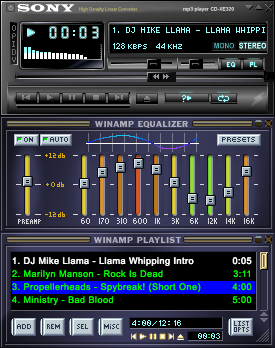
-------------- SONY AMP-XE320 -------------- skin for Winamp 1. Extract this file to your skin directory. like this C:\program files\winamp\skins\sony... 2. Sometimes extract program makes two directorys (\sony\sony\) 3. You can make new directory to C:\program files\winamp\skins folder and move skin files there from ...\skins\sony\sony\ 4. Then you can delete old directory, but make sure you have moved those skin files to the new di
↓ Sony_amp 3.wsz
2 downloads
0 favorites
0 comments
No comments yet.
Sign in to leave a comment.
0 Comments